Add the line targets
A target is the acceptable range for a single answer. Where the score grades the delivery as a whole, a target judges one reading at a time: an answer inside the range passes, an answer near the edge passes with a warning, and an answer beyond the limit fails. The inspector sees that verdict on the line as the reading is entered.
Targets are optional. The plan already grades deliveries without them, but they give the inspector immediate feedback on each reading rather than only a grade at the end.
Set targets from the plan lines: select the Target field on a line to open the Quality Control Plan Line Target card. The field shows Set or Not Set, so you can see at a glance which lines have targets. Targets can only be edited while the plan's Status is New or Inactive.
Add targets to three lines.
TEMP — a range in both directions
| Field | Value |
|---|---|
| Lower Limit | 7 |
| Lower Warning | 9 |
| Target | 11 |
| Upper Warning | 13 |
| Upper Limit | 15 |
| Answer | Result |
|---|---|
| Below 7 | Fail |
| 7 – 9 | Pass with warning |
| Above 9 and below 13 | Pass |
| 13 – 15 | Pass with warning |
| Above 15 | Fail |
Tomatoes are damaged by cold as well as heat, so this reading has limits at both ends. It is the most complete shape a target can take.
Note where the boundaries fall: the pass zone lies strictly between the two warning values. An answer of exactly 9 or exactly 13 passes with a warning, not cleanly.
COLOR — an option where riper is better
The Lower Limit, Lower Warning, and Target fields are selected from the option list, and the sequence of the chosen value sets the boundary.
| Field | Value |
|---|---|
| Lower Limit | Breakers |
| Lower Warning | Turning |
| Target | Pink |
| Answer | Result |
|---|---|
| Green | Fail |
| Breakers, Turning | Pass with warning |
| Pink, Light Red, Red | Pass |
No upper values are set, so anything riper than the target passes. The colour options were created in ripeness order for exactly this reason — the sequence is what the target compares against.
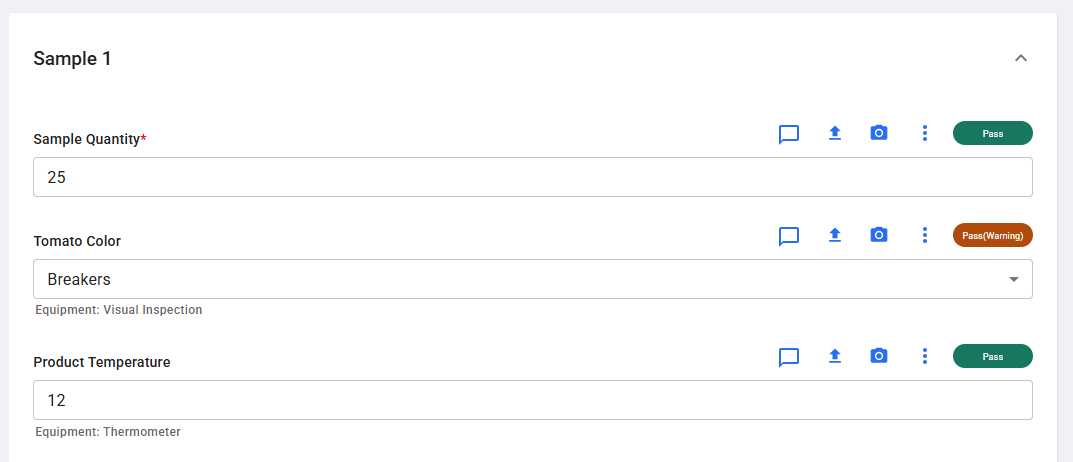
Each line shows its verdict as the answer is entered. Here a colour of Breakers has produced a warning, while the sample quantity and temperature have passed:
DMG — an option where one answer is simply wrong
| Field | Value |
|---|---|
| Lower Limit | No |
Yes sits below the limit and fails; No passes. Leave Lower Warning and Target blank. This is the shape to use for a yes-or-no question where one answer is unacceptable, and it works because No has the higher sequence of the two.
Leave Lower Warning blank here rather than setting it to No as well. An answer equal to the lower warning value is treated as the edge of the range and returns Pass(Warning), so setting both fields to No would make the good answer report a warning on every check. With only a limit set and no warning values at all, an answer inside the limits passes cleanly.
What a failed line does, and does not, do
A line result is feedback on one reading. It does not decide the outcome of the check.
Because this plan has scoring configured, the result of the check comes from the score alone. A delivery can carry a failed temperature reading and still be graded green, if its defect percentages are within the green thresholds. Only a plan with no scoring falls back to the simpler rule where any failed line fails the whole check.
If a reading should influence the grade, it has to be expressed as a score criterion rather than a target. For an Option question such as DMG, that means a criterion with a Calculation of FAIL RATE — the only calculation an option question supports — set against the percentage of answers allowed to fail.
Two other fields interact with targets:
- Target Blind on the plan line hides the target values from the inspector during the check. Consider it when you do not want the expected range to influence what gets recorded.
- Failure Action Plan on the plan line creates a quality action when that line fails. It is left blank in this walkthrough, so a failed reading records the failure without raising follow-up work.
For more information, see Quality control plan line targets.
Next step: Create the score codes