Set up approved suppliers
You can set up facility numbers (for example, a GLN number) as lot attributes to ensure that lots are received only from order addresses specified in purchase documents. This helps align purchasing from specific order addresses associated with the facility number. For more information, see Manage purchase documents.
Set up approved suppliers
You can set up a unique identifier for the facility number that the system must display as a lot attribute on the Lot Attribute Values page.
- Select the Search icon
 , enter Approved Supplier Setup, and then choose the related link.
The Approved Supplier Setup page opens. -
On the General FastTab, in the Lot Attribute Facility Number field, select a lot attribute with the Type field value set to Text.
The system displays the selected Lot Attribute Facility Number field value on the Lot Attribute Values page for purchase documents.This functionality is available only when the Aptean Advanced Attributesextension is installed.
-
In the Purchase Enforcement Point field, select an option to represent when supplier approval enforcement should occur.
The available options are: - On Entry – validates supplier approvals as purchase order lines are entered, immediately blocking noncompliant entries.
-
On Release – validates supplier approvals when purchase orders are released, allowing planning with warnings during entry.
Changing the enforcement point determines when approved supplier validation blocks users. The system prompts you to confirm before applying the change.
-
On the Purchase Approved Supplier List Settings FastTab, in the Default Status Filter field, select one or more status values. The system applies the selected filter each time you open the Purchase Approved Supplier List page from a purchase document. You canleave the Default Status Filter field value blank to view all records without any status filter applied.
Set up lot attributes
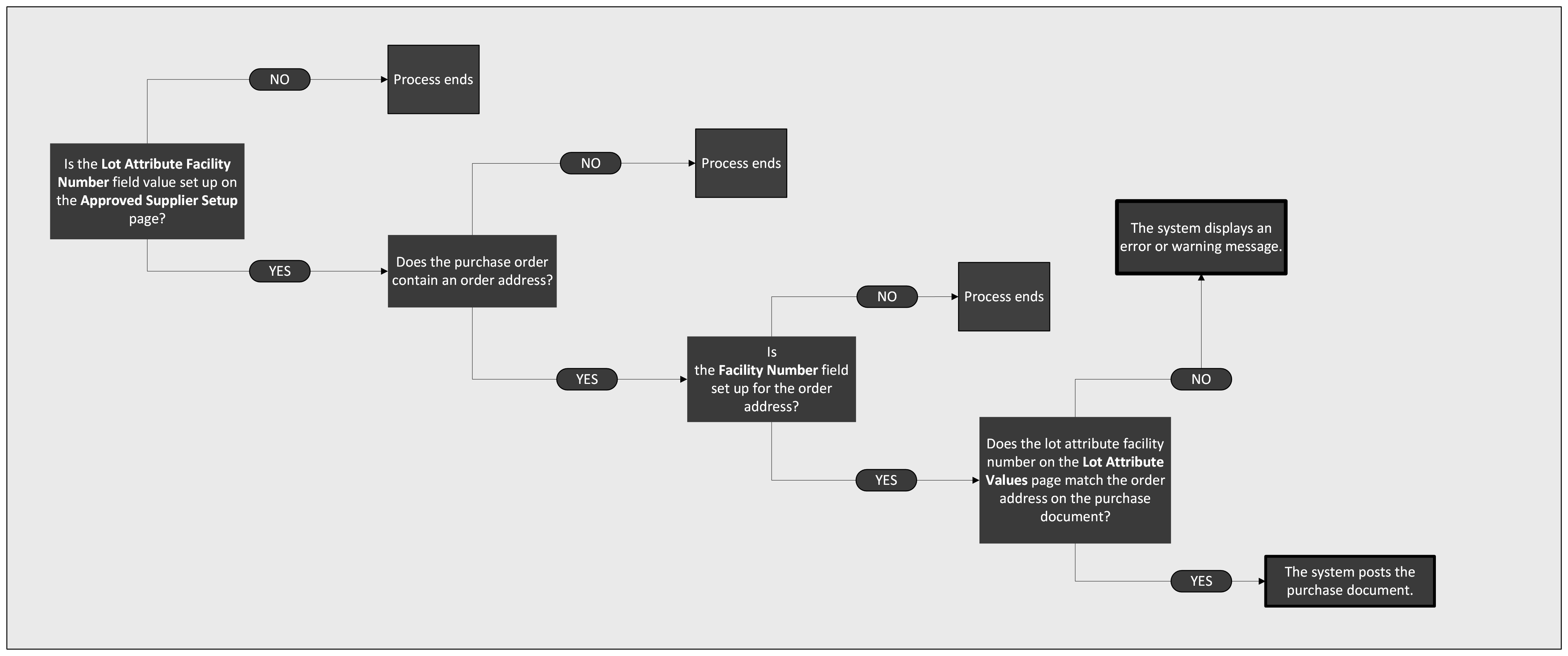
When the Mandatory field value for the lot attribute facility number is set to At Posting on the Lot Attributes page, the system enforces the functionality and displays an error message on purchase documents.
Set up order address
You can assign a facility number to an order address to validate lot attributes during purchasing.
- Open the Order Address page.
- On the Approved Supplier FastTab, in the Facility Number field, enter a unique identifier for the facility. This value can also be referenced as the registration or establishment number of a supplier, ensuring compliance with regulatory requirements.
The order address is set up.
The system performs the following checks when posting a purchase document.