Bulk synchronization of outbound events
The bulk synchronization feature allows Business Central to synchronize multiple records such as vendors, order addresses (supplier sites), currencies, payment terms, items, units of measure, item units of measure, customers, ship-to addresses, and locations with target products in a single operation. This helps ensure that all master data is consistent between systems without manually updating each record.
Steps to perform bulk synchronization
The following steps are involved in bulk synchronization:
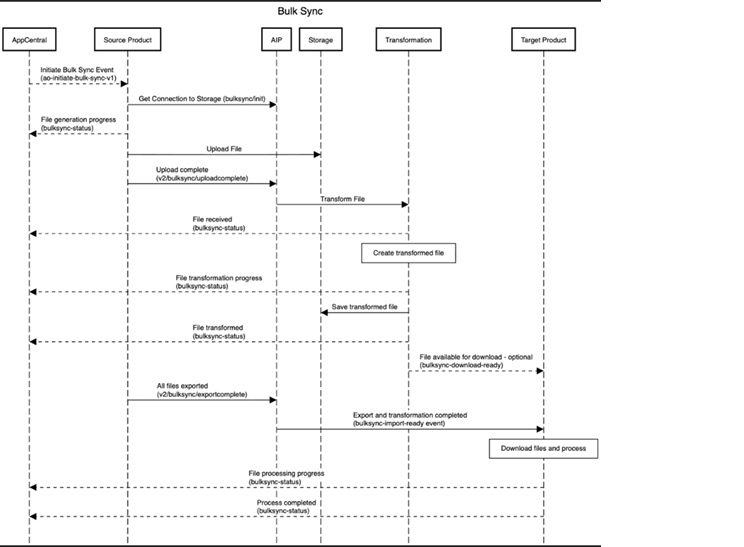
Initiate bulk synchronization
A bulk sync event is triggered in Business Central to start the process.
Upload Data
The system generates a file containing the data to be synced and uploads it to the integration platform (AIP).
Transform Data
A transformation process formats the uploaded file so that it can be correctly processed by the related product.
File Status Updates
The system tracks the progress of file generation, upload, transformation, and processing, providing status updates throughout the process.
Export to associated product
Once the file is transformed, it is exported to the associated product. The data is then available for the related product to download and process.
Supported records
- Vendors
- Order Addresses
- Currencies
- Payment Terms
This ensures that all these records in Business Central are reflected in the related product accurately, reducing manual effort and preventing inconsistencies.
Outbound events
The following outbound events support both real-time updates and bulk synchronization:
Vendor events
Business Central sends vendor information to the target product through the vendor-createdormodified-v1 outbound event.
The target product consumes this data through its vendor-created-v1 event.
Business Central includes the Currency Code and Payment Terms Code field values in this event.
Currency events
Business Central sends following events when currency records are created, modified, or deleted.
- currency-createdormodified-v1
- currency-deleted-v1
Payment terms events
Business Central sends following events when payment terms records are created, modified, or deleted.
- paymentterms-createdormodified-v1
- paymentterms-deleted-v1
Order address events
Business Central sends the following events when order addresses are created, modified, or deleted.
- orderaddress-createdormodified-v1
- orderaddress-deleted-v1
However, the target product does not yet have corresponding inbound events to process currency, payment terms, and order address data.
Item events
Business Central sends the following events when item records are created or modified.
- Item-CreatedOrModified-v1
Item Unit of Measure events
Business Central sends the following events when item unit of measure records are created or modified.
- ItemUnitOfMeasure-CreatedOrModified-v1
Unit of Measure events
Business Central sends the following events when unit of measure records are created or modified.
- UnitOfMeasure-CreatedOrModified-v1
Customer events
Business Central sends the following events when customer records are created or modified.
- Customer-CreatedOrModified-v1
Ship-to Address events
Business Central sends the following events when ship-to address records are created or modified.
- ShipToAddress-CreatedOrModified-v1
Location events
Business Central sends the following events when location records are created or modified.
- Location-CreatedOrModified-v1
Bulk Sync All Master Data
The Bulk Sync All Master Data action synchronizes all supported master data entities between Business Central and the target product in a single operation.